45 KiB
Google Cloud CI/CD Pipeline (GCP DevOps Engineer Track Part 3)
Understanding Google Cloud CI/CD Pipelines
Big Picture
- Taking Code changes (deltas) and automatically shepherding them through the process to become a running system, that the users of that system can actually use.
- CI/CD system is internal software that serves the purpose of managing other software (internal or external)
- CI/CD deploying to Prod e.g. GCP
- Continuously - Why? - We avoid a lot of problems when we do things continuously, or rather we get loads of problems when we don't do things continuously. Higher cost when things are done regularly
- Error-Prone Humans
Costs of a software Project
- 43% in Testing
- Cost of removing an issue goes up dramatically as the phases of the project continue
- 33% Cost reduction from a good QA system
- 70% of outages are due to changes in a live system
- At least 10% (lower bound) cost saving by implementing CI/CD
Martin Fowler - Software Guru (Agile, Scrum CI/CD)
- "break down the barries between customers and development"
- "allows your users to get new features more rapidly"
- "more rapid feedback on those features"
- "more collaborative in the development cycle"
- "dramatically easier to find and remove [bugs]"
- "dramatically less bugs, both in production and in process"
- "reduced risk"
Relating SRE to CI/CD
Martin Fowler - "Continuous Integration is a software development practice... [that] allows a team to develop cohesive software more rapidly" - Make better software - Faster!
Make Software Faster
- Efficiency
- Not just efficiency
- Changes how you interact
Make Better Software
- Feedback Loops
- Other Stuff
- Leads to "Faster"
"I think the greatest and most wide ranging benefit of Continuous Integration is reduced risk"
Many many smaller changes instead of single large changes
Understanding Continuous Integration
What is CI?
"Continuous Integration is a software development practice where members of a team integrate their work frequently, usually each person integrates at least daily - leading to multiple integrations per day. Each integration is verified by an automated build (including test) to detect integration errors as quickly as possible"
Purpose:
- Ensure the updated codebase is at least functional. Not completely broken. - This is a "Quality Bar"
Understanding Continuous Delivery
What is CD?
"Continuous Delivery is a software development discipline where you build software in such a way that the software can be released to production at any time"
- Can be a major event
- Making a deployment a big deal is an unnecessary problem.
- Ensure the updated codebase is at least as good as it used to be - so it is releasable
- This is also a "Quality Bar"
Regression - When some functionality broke e.g. a bug specifically when something used to work but now doesn't.
CD is all about preventing regressions
If the new feature doesn't work perfectly, the worst case scenario is that at least it worked like it did before.
Understanding Continuous Deployment
What is Continuous Deployment?
"[A]utomatic deployment helps both speed up the process and reduce error. It's also a cheap option since it just uses the same capabilities that you use to deploy into test environments"
Reducing Errors - Requires high quality
Purpose - Make the newly updated and validated codebase available to the users. This is automation of an action. Absolutely requires excellent automated testing in that continuous delivery stage.
Just because this newly updated and validated codebase is available to the users, this does not always mean that the updated functionality will immediately be available to those end users. I would say, in fact, it's ideal if that new functionality is not made available by the deployment... sound strange? Why is this?
Because the risk of making any change is larger when the known impact of that change is larger, then you should try to reduce the impact of the change instead. If you deployed the new code base and you know that there should be no visible impact on the users, then all of your metrics should actually show that right? The evidence of what your users are doing now should corroborate your story and not contradict it. That's just good science, and of course good science underpins good engineering.
Feature Flags/toggles - really valuable to this situation
Really valuable tool in toolbox. Feature flags/toggles are a powerful technique allowing teams to modify system behaviour without changing code. Now the point I'm trying to make, is if you can modify behaviour without modifying the code then you can also use these to modify code without modifying behaviour, and this is how you use them to manage risk. When you're doing something new, you build that new thing into the system, and you continuously integrate what you're doing, but to stop those unfinished changes of yours from breaking everyone else, you should put your changed functionality behind a feature flag. Make it so that the default behaviour is unchanged from how it was before you started making your changes. This means that you're not regessing any previous funtionality and you leave your feature flag defaulting to "off" until you are ready to have other people using your new thing, then you turn it on for them. And by doing this you can then manage the roll-out of the feature completely independently from the rollout of the changed code. In fact, your half finished feature will likely have been deployed several times already, but it won't have caused any problems because you managed its impact with a feature flag and each deployment would have gone through your full CI/CD pipeline to validate the quality is still there. But then, when you fully rolled out that new feature and everyone is using it and you're sure you don't want to roll it back then you can simply remove the feature flag to simplify your codebase to remove that little bit of technical debt.
"If you deploy into production one extra automated capability you should consider is automated roll-back. Bad things do happen from time to time... Being able to automatically revert also reduces a lot of the tension of deployment, encouraging people to deploy more frequently and thus get new features out to users quickly"
"We engineer both changes and change management systems to reduce risk, and efficiently build great software"
Bringing CI and CD (and CD) Together
|---- "CI" From "Codebase" to "Deployable Build" ----|
Codebase --{Integrate i.e. "Build" (v.)}--> Build (n.) / Artifacts, Containers, compiled code --{Deliver}--> Deployable Build --{Deploy}--> Running System
|---- "CD" From "Build" to "Running System" ----|
- Continuation From "Running System":
Running System --{Reflag}--> Released Feature --{Ask}--> Feedback --{Triage}--> Idea on Backlog --{Code (v.)}--> Code Change & Pull Request (PR) --{Approve}--> Return to "Codebase"
Whole system has come full circle
Continuous Integration on Google Cloud
GCP Continuous Integration Concepts
Challenges of Team-based Software Development
- Multiple Developers working on a single code base and/or related systems:
- Difficult to coordinate updates between multiple developers
- Incompatible updates from different developers = bugs and problems
- Large + infrequent updates = many bugs to fix
Solution: Continuous Integration!
- The 'CI' of CI/CD process
- DevOps culture of submitting smaller code changes, more often:
- Multiple submissions per day
- "Continuously" update code
Benefits:
- Smaller changes = fewer bugs to troubleshoot
- Fast changes = rapid fedback loop
- Rapid feedback loops = quickly resolve issues
- Result: Improved productivity and Return On Investment(ROI)!!
The CI Process - 5x Main components
- Source
- Build
- Test
- Report
- Release
CI Components - How do we make this work?
- Single Shared code repository
- Single source of truth
- Automated Build and Test tool:
- Key word: AUTOMATION
- Feedback loop for bugs
- Artifact Repository
- Release destination for built and tested code for future development
Continuous Integration Tools
| Source Control | Build & Test | Artifact Storage | |
|---|---|---|---|
| GCP | Cloud Source Repositories | Cloud Build | Container Registry |
| 3rd Party | Github, Bitbucket | CircleCI, Jenkins | docker hub, Maven etc |
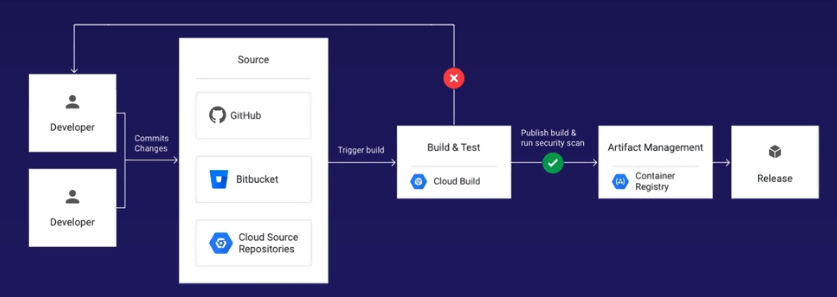
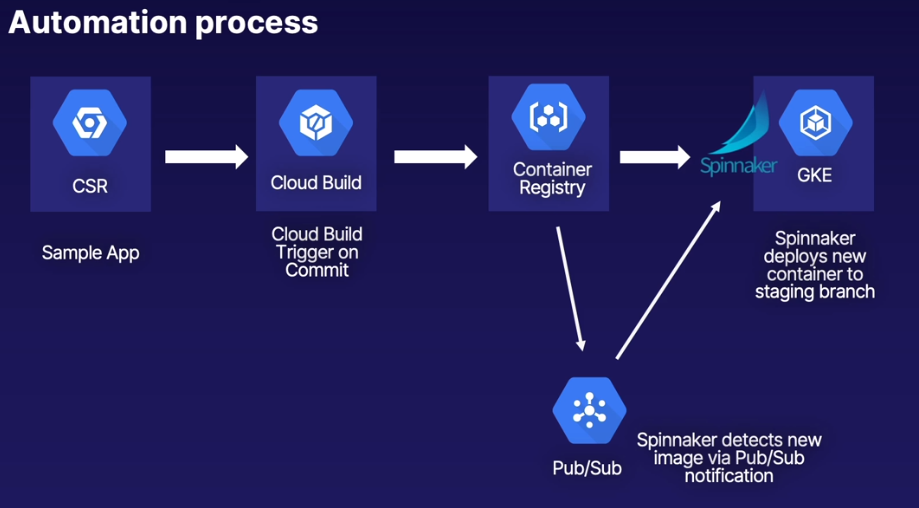
Developer (Commits) > Source Control (Cloud Source Repositories) > {Trigger Build} > Build & Test (Cloud Build) > {Publish Build & Security Scan} > Artifact Management (Container Registry) > Release
Only manual step is the actual "Commit", everything else is automated through tooling
Cloud Source Repositories
Cloud Source Repository Concepts
| - | - |
|---|---|
| Fully Managed Private Git Repository | Build, test, deploy and debug code right away |
| Native GCP Integration | Integrate with Cloud Build, Cloud Functions, Cloud Operations (formerly Stackdriver) and more |
| Sync/mirror third party repos | One-way mirror from GitHub/Bitbucket to CSR |
| Powerful code search | Google search for your code |
Development Environments and Cross-project access
- Google best practice = separate projects for each environment
- 'prod-project', 'dev-project', 'staging-project', etc
- CSR hosted in single project
- How to access single repo from multiple projects?
- Solution: grant IAM roles to members in other projects
Example: CSR in 'prod-project', accessible by 'John' in 'dev-project'
- Grant IAM access to John in either host project or host repo
- Project level = access to all repos in project
- Repo level = access to individual repo
IAM Roles
- Source repository Admin/Writer/Reader
- Admin: Full access (add roles, create/delete repo)
- Writer: Edit and commit code
- Reader: View only
CSR Hands On - Initial Setup and Deploy to Cloud Functions
- Create a repository in a project
- Web console and command line
- Clone Cloud Functions example into repo from GitHub
- Deploy Cloud Function directly from CSR
- Note: Familiarity with Git commands is assumed
gcloud services enable sourcerepo.googleapis.com
gcloud services enable cloudfunctions.googleapis.com
gcloud source repos create csr-demo
touch .gitignore && echo 'csr-demo/' > .gitignore
git add -A
git commit -m "Initial Setup and deploy to Cloud Functions"
gcloud source repos clone csr-demo
cd csr-demo/
git clone https://github.com/linuxacademy/content-gcpro-devops-engineer
cd content-gcpro-devops-engineer/
rm -rf .DS_Store .git/
git add -A
git commit -m "Initial Commit to CSR"
git remote -v
git branch -m main
git push origin main
- Setup Cloud function, pointing to repository that we cloned making sure to specify the sub-directory where the python code is located, create the function and then call it from the cli
➭ gcloud functions call function-1 --region="europe-west2" --data='{"name":"Alex"}'
executionId: 68kl6ybsinvx
result: <h1 style="margin:20px auto;width:800px;">Welcome to the GCP DevOps course,
  Alex!</h1><h2>Via Source Control Repo</h2>
CSR Hands On - Mirror Github and Cross-Project Access
- Mirror external GitHub repo to CSR
- One-way sync from GitHub to CSR
- GitHub is primary 'source of truth'. CSR is 'read-only' copy
- Grant access to user in another project
- Note: Not possible in Cloud Playgrounds
- Note: Granting access as repo/non-project level = cannot view cross-project repo via interface
- One-way sync updates are normally very quick after an update to a source repo, but the sync can be forced by clicking on the gear icon and clicking 'sync from GitHub'
Minimum scope (Source repository Writer role) to provide user permissions to clone/edit/commit a repo is by specifying the user at the repo level (clicking gear icon on repo -> Permissions). The user however cannot browse or discover the repo through the webUI, for that the user needs permissions at the project level. To discover add the user at the project level to IAM with "Source Repository Reader" role. This permissions will allow the user read permissions to every other repository within the project.
Hands On Lab - Migration Source Code to a Google Cloud Source Repository
Completed
Hands On Lab - Inteegrating Google Cloud Functions
Completed
Cloud Build
Importance of Automation
Life of a Kubernetes Container Deployment (i.e. manual 'stuff' you must do)
- Update code
- Build a docker container ('docker build')
- Push container to registry ('docker push')
- In kubernetes, update deployment YAML file
- Apply deployment YAML ('kubectl apply')
- Make sure nothing broke and it's working correctly
- Do it all again!
Google calls this..... "Infinite loop of Pain and Suffering"
- More manual actions = greater chance of human error
- Increased toil
- SRE objective = reduce toil
- Toil = manual and repetitive work that should be automated
- Solution: Automate it!
- Google 'Cloud Build' = 'automation engine'
Cloud Build Concepts
What is the Cloud Build service?
- Fully managed CI/CD engine
- Import source code
- Build in managed space
- Create artifacts
- Docker images, Java archive, Go applications, and more
How it works - high level overview
- Prepare source code
- Include build config file that calls 'Cloud Builder' (cloudbuild.yaml)
- Submit build (manual or automatic) to the 'Cloud Build' Service
- Cloud Build will execute build steps as defined
- Example: Build Docker container, Push to Container Registry, Deploy to service
- Submit build (manual or automatic) to the 'Cloud Build' Service
- Completed artifact (container image) pushed to GCP 'Container Registry'
Cloud Builders?
- Specialized Container images that run the build process
- Packaged with common languages and tools
- Google-manage, community-managed, public Docker Hub images
- Run specific commands inside builder containers
- Can also use custom build steps
Build File
- Provides instructions for Cloud Build to perform tasks using cloud builders
- Tells the cloud builders what to do
- YAML or JSON format
- Named cloudbuild.yaml/json
- Provides parameters such as builder image, arguments (steps), environment variables, and others
- Example: use docker and gcloud cloud builders to build and push a Docker file, then deploy container to Cloud Run
Building Docker files - two methods
- Build file (cloudbuild.yaml)
- Dockerfile directly handles build steps and pushed to Container Registry
- Add --tag option to build command
Automate build submissions with triggers
- Why automate?
- Reduce toil
- Reduce human error
How Triggers Work:
- Cloud Build looks for conditions, then executes build process when met
- Common triggers:
- Commit to repo/subdirectory/branch
- Commit tags
- Triggers sync to CSR, GitHub and BitBucket
- Pub/Sub for further automation
- Cloud Build automatically creates and publishes to own Pub/Sub topic for further automation
To Summarize:
- Cloud Build uses specialized cloud builders (containers) to execute build steps that you submit in a build file (cloudbuild.yaml config file)
- The build submission process can be done manually or automatically using triggers
Cloud Build Access Control
- End user IAM roles
- Cloud Build Editor, Cloud Build Viewer
- Editor: create, delete, edit, run and view builds
- Viewer: view build and build history only
- Cloud Build service account
- Automatically created when enabling API
- Executes builds on your behalf
- May need additional IAM roles to interact with other GCP services (App engine, GKE, etc)
- Scenario: Developers using Cloud Build need Cloud Build to deploy to their GKE cluster
- Solution: Grant the K8's Engine Developer role to the Cloud Build Service Account
Perspective: Access Control
Hands On - Prepare Cloud Build Environment
- Setup Cloud Source Repository and Cloud Build Service
- Explore app we will deploy
- Manually submit build using Dockerfile
- Deploy container to Cloud Run
- Assign Cloud Run Admin role to Cloud Build service account
- Manually submit build using build file to build, push, and deploy to Cloud Run
gcloud services enable sourcerepo.googleapis.com
gcloud services enable cloudbuild.googleapis.com
gcloud services enable run.googleapis.com
gcloud source repos create build-demo
gcloud source repos clone build-demo
git pull https://github.com/linuxacademy/content-gcpro-devops-engineer
cd cloud_build/build-run/
export PROJECT_ID=$(gcloud config list --format 'value(core.project)')
echo $PROJECT_ID
gcloud builds submit --tag gcr.io/$PROJECT_ID/build-run-image
gcloud run deploy cloud-run-deploy --image gcr.io/$PROJECT_ID/build-run-image --platform managed --region us-central1 --allow-unauthenticated
Service [cloud-run-deploy] revision [cloud-run-deploy-00001-jik] has been deployed and is serving 100 percent of traffic.
Service URL: https://cloud-run-deploy-zvr7ikogba-uc.a.run.a
Use cloud run so you don't have to get into using GKE and get the container spun up as quickly as possible
- Need to give Cloud Build access to the Cloud Run service to access it on our behalf. Complete this @ Cloud Build -> Settings -> Service Account Permissions -> Cloud Run Admin -> Enabled
- Now the Cloud Build service account has admin access to the Cloud Run service
gcloud builds submit --config cloudbuild.yaml
Hands On - Automate Build with Triggers
- Raw code to deployed container
Up to this point we are updating source code, then manually submitting to Cloud Build; we want to automate this, and sync from source repository and use triggers
- Create a trigger to automatically start build on code commit
- Use separate build file with specific Dockerfile path
- Use separate build file with specific Dockerfile path
- Demonstrate fully automated build with triggers
- Only manual action is to commit code, Cloud Build handles the rest
- Only manual action is to commit code, Cloud Build handles the rest
- Create triggers
Cloud Build > Triggers > Create Trigger (Name: trigger-build, Event: Push to a branch, Source: build-demo, Branch: master, Build Configuration: Cloud Build configuration file (yaml or json), and specify location e.g. root(/cloud_build/build-run/trigger-build.yaml) of the repo) > Create
Check the paths within each
cloudbuild.yamlfile for theargsthat are passed. When run locally,argspath maybe simply the local directory.when run remotly from Cloud Build, you need to specify the path within the repo, from the root e.g.cloud_build/build-run/.
- Make changes to code, commit, and push, then check Cloud Build History; notice the Source has changed from
Google Cloud Storagetobuild-demowhich is the repository name
gcloud beta builds triggers create cloud-source-repositories \
--repo=build-demo \
--branch-pattern="^master$" \
--build-config=cloud_build/build-run/trigger-build.yaml
Best Practices for Build Performance
How to Build Faster
-
Leaner containers
- Building application + assembling runtime environment in Dockerfile = very large and slower container
- Solution:
- Separate app build process and runtime build via cloudbuild file e.g. Terraform runtime?
- When possible, use light Docker images such as Alpine
-
Using Cache options
- Cache container build artifacts in Container Registry or Cloud Storage
- Stores and index intermediate layers, which can be re-used in your builds
-
Customize virtual machine sizes for build process
- Cloud Build uses standard-size high managed VM's to execute builds
- For large builds, specify high CPU machine types
- 8 and 32 CPU version available
cloudbuild.yamlsyntax:
    options:
      machineType: 'N1_HIGHCPU_8'
- Cut out unnescessary bloat
- Avoid uploading unnecessary files
- Include
.gcloudignorefile to reduce upload time - Typical excluded files:
.gitdistnode_modulesvendor*.jar
Hands On Lab - Establishing a CI/CD Pipeline with Google Cloud
Hands On Lab - Triggering a CI/CD Pipeline with Google Cloud Build
Have a go at implementing the Terraform example:
https://cloud.google.com/solutions/managing-infrastructure-as-code
n.b. Been searching for Approval process within Cloud Build e.g. part of the cDelivery part of CI/CD, and it doesn't exist, you have to use a 3rd party tool e.g. spinnaker (google developed)
Artifact Management with Container Registry
Container Registry and Artifact Registry
Artifact registry, announced in Spring 2020 and currently in beta, is the eventual successor to Container Registry
Artifact Registry, will store containers, as well as Java and NodeJS packages
Course (and exam) will focus on Container Registry, however we will make updates later if necessary
What is Artifact Management?
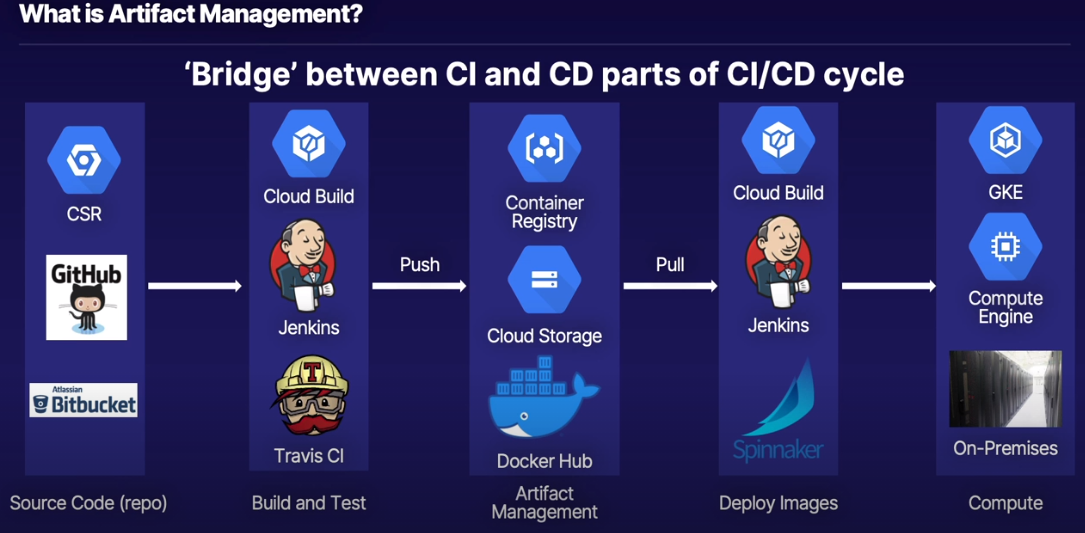
Artifact Management Services
- Docker Hub
- Container Registry
- Cloud Storage
- Store Java Packages, binaries, tarballs
- Point to GCS location (gs://my-bucket)
- Upcoming Artifact Repository service will handle above artifacts
- Store Java Packages, binaries, tarballs
- All above examples can be public or private
Why use Container Registry?
- Native integration with other GCP services
- Better access control via GCP IAM (compared to DockerHub)
Container Registry Concepts
What is Container Registry?
- Private GCP-native container image registry
- Docker and OCI image formats
- Native integration with other GCP services
- Behind the scenes: images stored in Cloud Storage
- Container Regiustry is management layer
- 'Shift Security to the Left'
- Think about security early in the CI/CD process
- Vulnerability scanning
- Binary authorization
Image management syntax
- Command format when tagging, pushing or pulling images to/from Container Registry
[HOSTNAME]/[PROJECT_ID]/[IMAGE]:[TAG](or @digest)gcr.io/my-project-id/app-image:1.1.1gcr.io= google container registry- Defaults to US continent
us.gcr.io,eu.gcr.io, orasia.gcr.ioto specify Container Registry storage location
Access Control
- No direct Container Registry roles
- Cloud Storage access needed
- Push images = Storage Object Viewer (or higher)
Service Account Authentication (to Cloud Storage)
- 3rd party ('off GCP') or cross-project applications
- Jenkins, Spinnaker, etc not on GCP services (e.g. on-prem)
- Spinnaker/Jenkins/etc runningon a GKE cluster will authenticate with cluster service account
- Grant service account associated with application appropriate Storage IAM role
- Default Compute Engine Service Account
- Grant appropriate scope to Storage
- Read or Read/Write scope to storage
Container Registry Hands On
To Cover:
- Manually create and push images into Container Registry:
- Pull images from Container Registry into Cloud Shell
- Explore Container Registry options
gcloud services enable containerregistry.googleapis.com
git clone https://github.com/linuxacademy/content-gcpro-devops-engineer
cd content-gcpro-devops-engineer/cloud_build/build-run/
export PROJECT_ID=$(gcloud config list --format 'value(core.project)')
docker build -t gcr.io/$PROJECT_ID/build-run-image:v1.1 .
docker push gcr.io/$PROJECT_ID/build-run-image:v1.1
docker images
docker image rm <image id>
docker pull gcr.io/$PROJECT_ID/build-run-image:v1.1
Milestone: Changing Gears
Continuous Deployment/Delivery Overview
GCP Continuous Deployment Concepts
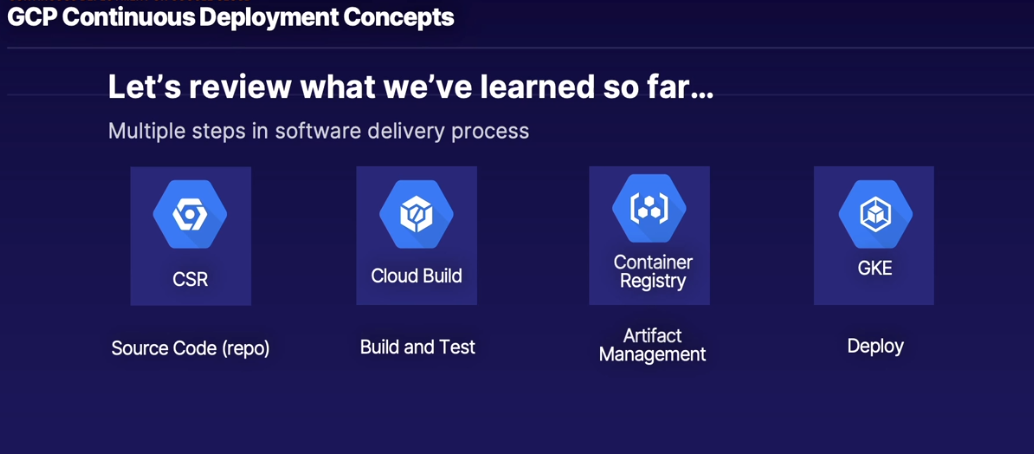
Purpose of CI/CD - Automate it!
- Less toil
- Less errors
- Act quicker
- Greater ROI
"Automate all the things"
CI creates and stores containers CD deploys our containers
Where do we deploy our containers?
-
K8's!
- Full customization and control vs. other services
-
Deploy containers...
- ... as pods
- ... onto nodes
- ... and expose them to the world (service)
-
Continuous Delivery/Deployment on GCP automates container deployment to compute services (GKE)
Importance of Deployment Automation
The 'manual toil cycle' that we want to avoid:
| Solved by CI | - Update code |
| - Build a docker container ('docker build') | |
| - Push container to registry ('docker push') | |
| Need to automate deployments | - In kubernetes, update deployment YAML file |
| - Apply deployment YAML ('kubectl apply') - replicaSets etc | |
| - Make sure nothing broke and it's working correctly | |
| - Do it all again! |
How do K8's deployments work?
- YAML files!
- Deploy pods
- Updating pods
- Deployments often manage ReplicaSets, which maintain a desired number of pods
- Managing # of replicas is important when discussing more complex deployment models
Cloud Build did perform the 'Deployment' part of CI/CD but it's too simplifed e.g.
- Fully replaces current version of pods with newer versions
- How can we switch between versions of out app?
- Deploy updates to small subset of users?
- Roll back if something breaks?
- Specialized deployment tools are required
Deployment Models
Why do we care?
- Simple deployment model:
- Deploy latest application (container) straight to production
- Completely replace previous version
- Cloud Build can perform simple deployments, but not more complex ones
Complex Deployment Models:
- Blue/Green Deployment (sometimes referred to as Red/Black)
- Canary Deployment
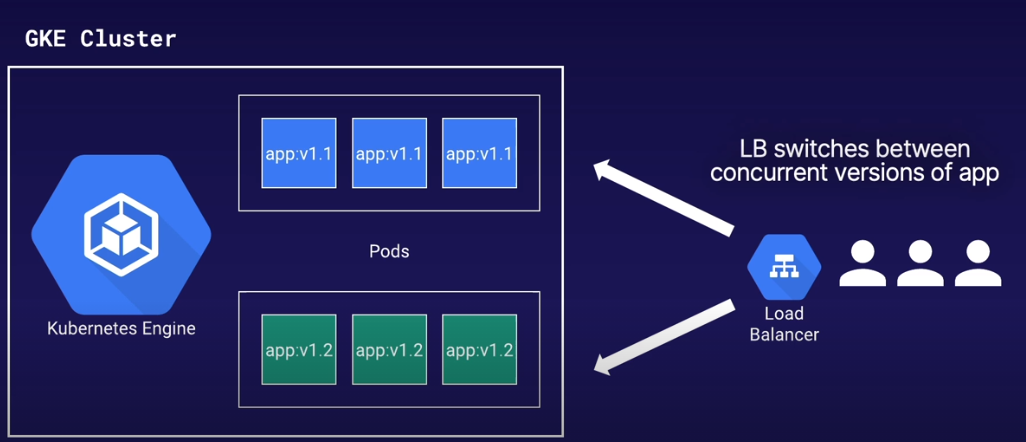
Blue/Green:
- Run two identical production environments (with different versions)
- Only one environment is live
- Once newer version is completely deployed, switch to newest version
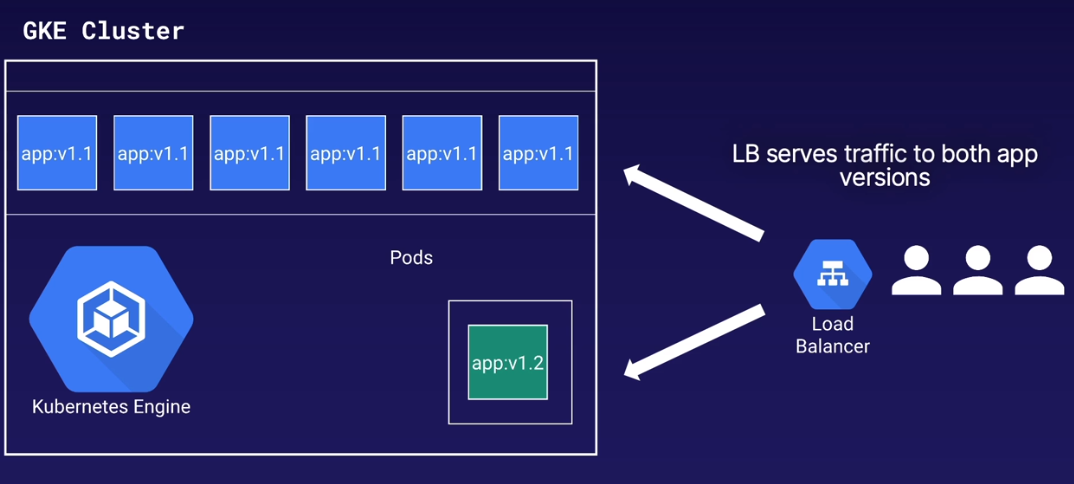
Canary:
- Deploy production update to small subset of users
- Multiple live app versions, but traffic split between versions
- Useful for 'risky' updates, exposed to small percentage of users
- If something goes wrong, redirect all traffic to 'safe' version
- When 'canary' update is deemed safe, direct all traffic to newer version
Manually managing deployment models? - Update those YAML files!
- appv1-1.yaml
- replicas: 10
- image: app:v1.1
- appv1-2.yaml
- replicas:1
- image: app:v1.2
- lb-service.yaml
- Set selectors for each app version (blue-green deployment)
Continuous Deployment Tools
What do we need from a CD tools?
- Automate deployment process
- Manage blue-green deployments
- Switch between app versions (service selectors)
- Manage replicas between app version (canary)
- Provide ability to approve pushing new version to production - Cloud Build cannot do this
Authenticating CD Tools
- Use Service Accounts for authentication
- On premises or on GCP, service account as authentication account
Tools - many choices!
- Jenkins
- Travis CI
- Cloud Build
- Spinnaker
- Developed by Netflix and Google
- Open source, multi-cloud delivery platform
- Automate deployments - manually approve moving staging into production
To summarize:
- Managing complex deployments requires multiple updates
- Manually updating deployments and services = Toil
- TOIL = BAD, AUTOMATION = GOOD
- CD tools automate container deployments (even complex deployments), so we don't have to do it ourselves
- Result: no more cycle of suffering!
Spinnaker
Spinnaker Concepts
Section Overview:
- Cover exam focused concepts for Spinnaker
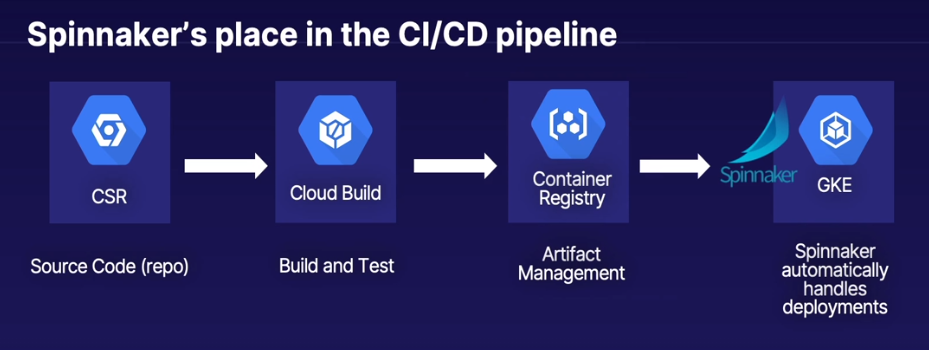
- Spinnaker's place in the CI/CD pipeline
- Spinnaker's interaction with K8's
- Install Spinnaker on GCP using Google-provided scripts/GitHub
- Deploy sample CI/CD pipeline using Google-provided scripts:
- We will modify pipeline for out own custom application later
Course focus and scope
- CD tools are very complex
- We will not go through a full deep dive of Spinnaker
- We will cover the "need to know" requirements for:
- CI/CD integration
- Kubernetes interaction
- Setting up and using on GCP
Why focus on Spinnaker vs. other CD tools?
- Google's documentation on Dev/Ops favors Spinnaker as cloud-native CD tool
- Spinnaker codeveloped by Google and Netflix
- Covered on exam
What is Spinnaker?
- Continuous Delivery tool:
- Automated application management and deployment
- Application management:
- View and manage GKE components
- Application version, load balancers, etc.
- Application deployment:
- Blue/Green, Canary deployments
How does Spinnaker work?
- Remember those K8's YAML files?
- Spinnaker does it for you!
- Create YAML files
- handles kubectl commands
- Creates deployments, updates ReplicaSets, create load balancers with services
- No more manual
'kubectl apply <yaml file>'
Hands On - Set Up Spinnaker
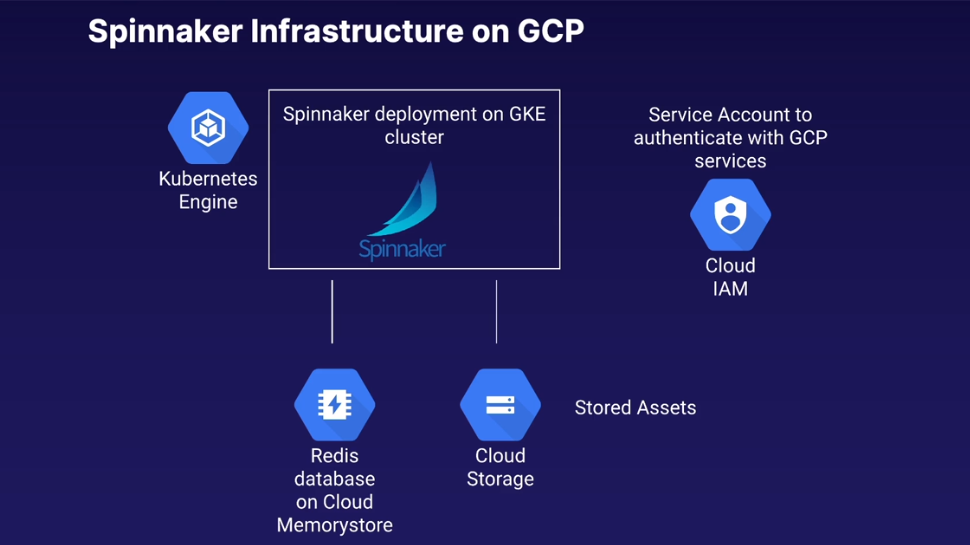
- Spinnaker on GCP infrastructure
- Install Spinnaker using Google-provided GitHub/scripts
- Next lession will create sample application pipeline from this lesson
Installing Spinnaker - Challenges
As of course writing? 2019? - There is no native complex Continuous Delivery tool built directly into GCP
- Not a natively integrated service
- Requires installing 3rd party software on top of K8's
- Fortunately, Google recently supported install via maintained GutHub
- Installed with guided Cloud Shell tutorial
Getting Started:
- Google's Spinnaker Guided Install Overview:
- Cloud Marketplace solution - launches guided Cloud Shell tutorial from cloned GitHub:
- Important: If using Cloud playgrounds/lab, must change default GKE machine type
- Follow the marketplace (2nd) link - Clone git repo, open cloud shell and follow instructions
git config --global user.email "alexander.soul@computacenter.com"
git config --global user.name "Alex Soul"
export PROJECT_ID="instance-testing-6452"
~/cloudshell_open/spinnaker-for-gcp/scripts/install/setup_properties.sh
cloudshell edit \
    ~/cloudshell_open/spinnaker-for-gcp/scripts/install/properties
Begin the installation:
~/cloudshell_open/spinnaker-for-gcp/scripts/install/setup.sh
setup.sh
- Enable appropriate API's
- Create our authentication service account if not already exists
- Grant the IAM roles necessary to that service account to the rest of our Google Cloud CI/CD services
- Go through process of creating GKE cluster
- Installing Spinnaker on the cluster
- Creating our Redis Instance and our Cloud storage buckets
- Installing all the other Spinnaker bits and pieces e.g. "halyard"
- All other config required to make spinnaker work - Google made simple via script
After installation completes, check created resources:
- GKE Engine
- Cluster name: spinnaker-1
- 3x node cluster
- Application:
- spinnaker-1
- Cluster name: spinnaker-1
- Compute: 3x worker nodes
- Storage
- GCS Bucket
- Memorystore
- Redis: spinnaker-1
- Cloud Source Repositories
- spinnaker-1-config // contains config files for spinnaker
- Pub/Sub
- Topics > spinnaker-1-notifications-topic
- will be used for example pipeline. Used to connect container registry to spinnaker by setting up a subscription and publisher in which spinnaker will be informed of new containers hitting container registry from which spinnaker will automatically pull the latest version of that container into a staging environment
- Topics > spinnaker-1-notifications-topic
Connect to Spinnaker - 2x options
-
Forward port 8080 to tunnel to Spinnaker from the cloud shell
-
Export Spinnaker publicly - 30-60 minutes using identity aware proxy
-
Network Services
- Load Balancing: ingress
clientID: 997580377062-hvnvte2r4kvaq9j3r9abklithamou0se.apps.googleusercontent.com secret: 5hCO0_7yyJjpQRo-9M6QIkY-
https://spinnaker-1.endpoints.instance-testing-6452.cloud.goog/ # Got blocked by CC Cisco Umberella rubbish
Can locate the url by Navigating to: Network Services > Load Balancing > Clicking on *spinnaker-deck-ingress* > Frontend HTTPS > Certificate (spinnaker-1-managed-cert) > Domain status
Incase cloud-shell is disconnected, re-launch via:
cloudshell launch-tutorial ~/cloudshell_open/spinnaker-for-gcp/scripts/install/provision-spinnaker.md
Hands On - Deploy Sample App/Pipeline
halyard == cli for Spinnaker configuration
spin == cli for Spinnaker
deck == WebUI for Spinnaker
Remember that any configuration changes you make locally (e.g. adding accounts) must be pushed and applied to your deployment to take effect:
~/cloudshell_open/spinnaker-for-gcp/scripts/manage/push_and_apply.sh
Delete all resources associated with Spinnaker:
~/cloudshell_open/spinnaker-for-gcp/scripts/manage/generate_deletion_script.sh
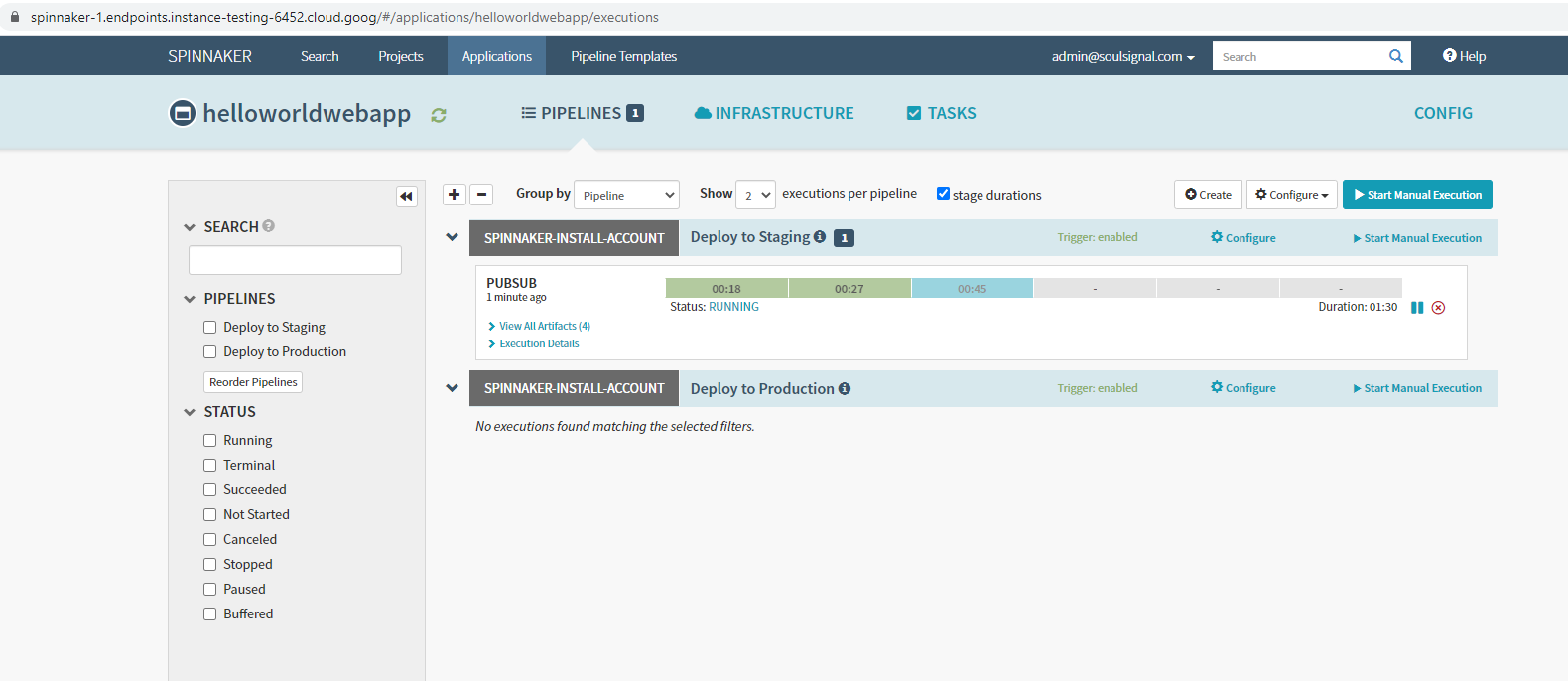
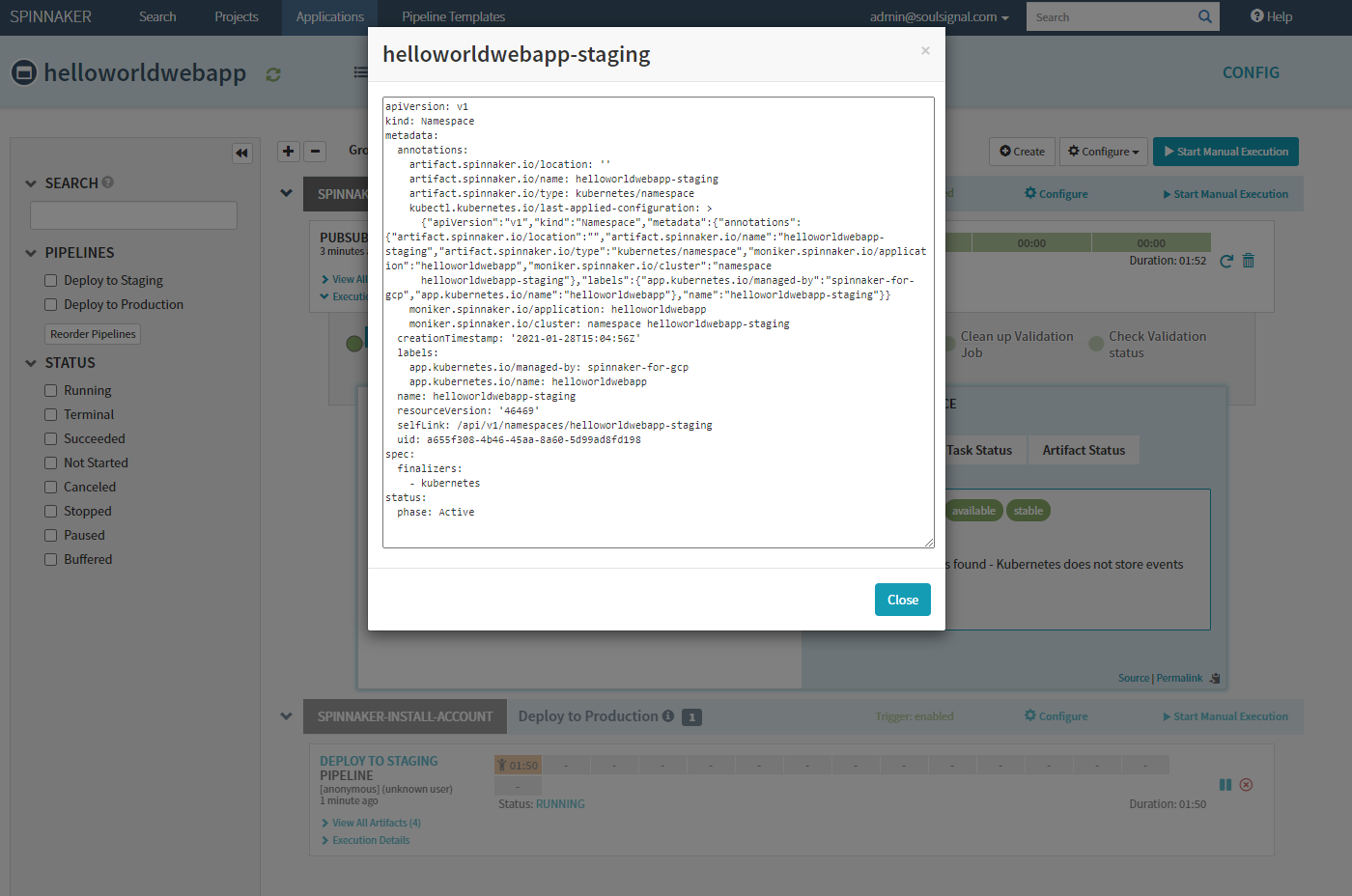
Spinnaker created and applied appropriate Namespace, Services & ReplicaSets for the application
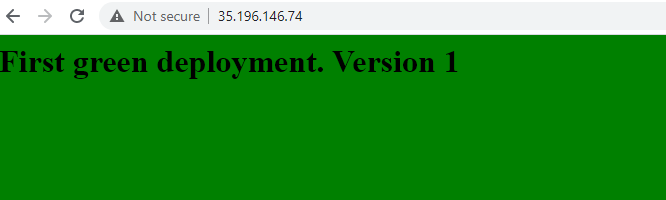
- To preview staging application, before promotion to production:
- Within
deck> Infrastructure > Load Balancers > ClickHELLOWORLDWEBAPP-STAGING> Scroll down toIngress, copy IP and paste into browser
- Within
- Approve deployment to production:
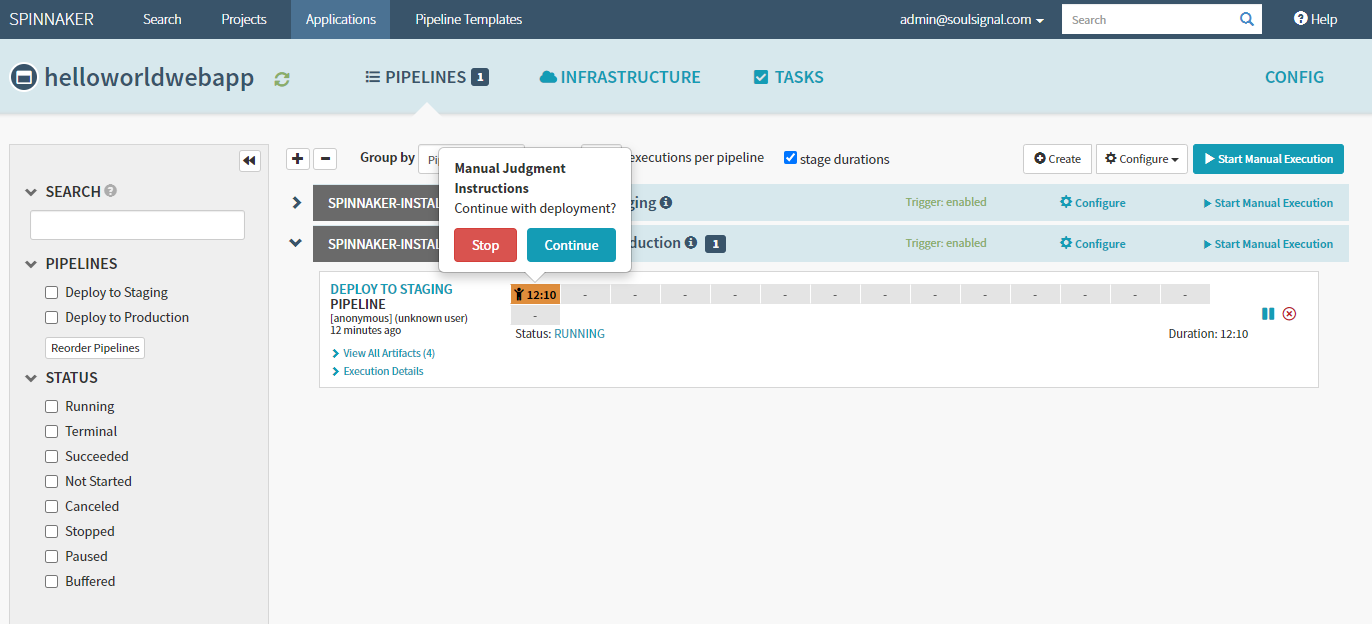
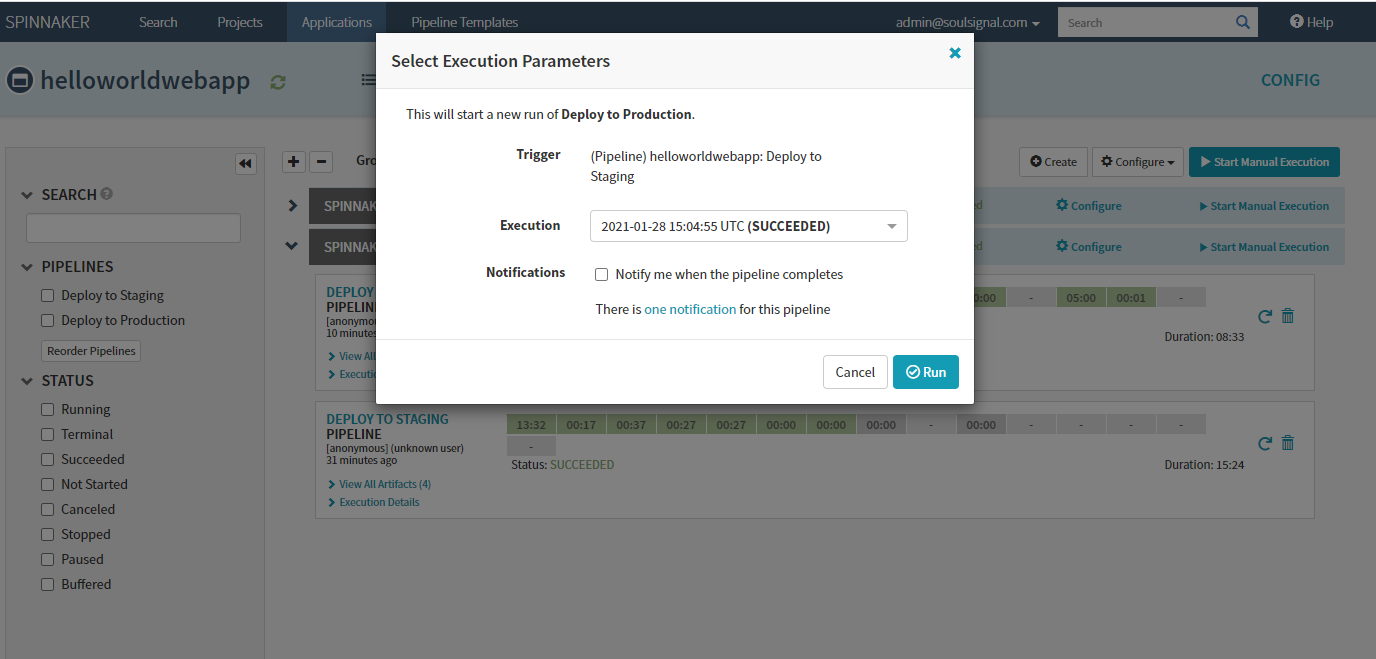
- Rollback Prod to Version 1
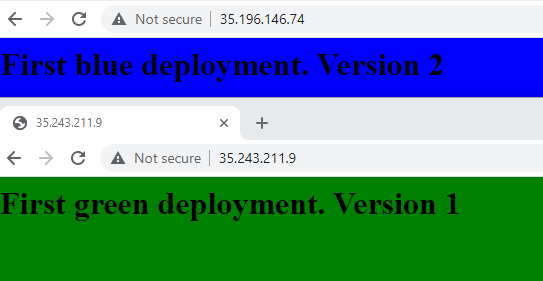
- Expand the "Deploy to Production" pipelines and on the first pipeline to run e.g. the piepline at bottom, next to the rubbish bin icon, click the undo arrow and accept the prompt
- Final rolled back Prod Environment, now in Green
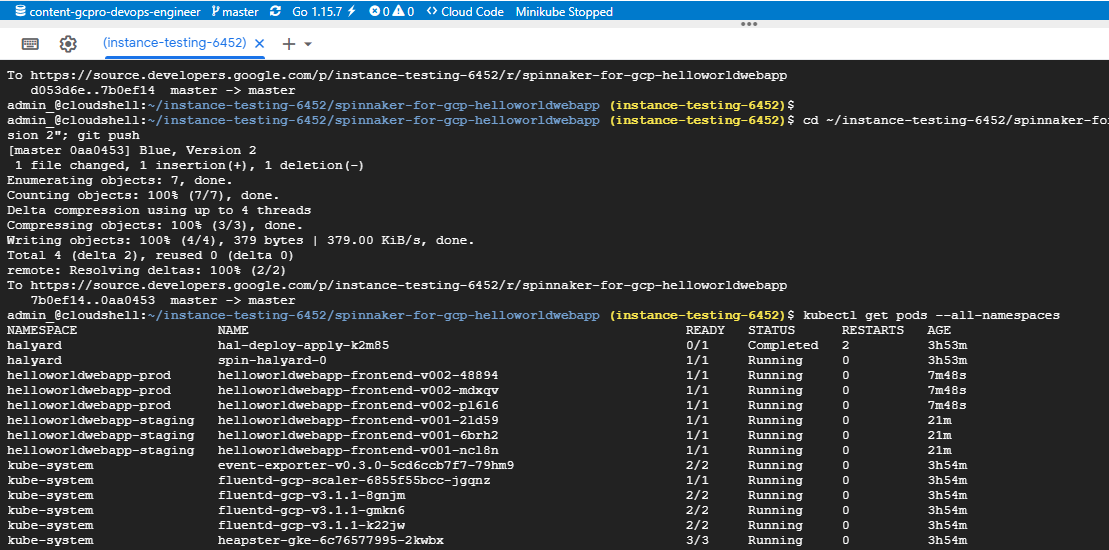
- Examine deployed pods
Milestone: Are We There, Yet?
Securing the Deployment Pipeline
Managing Secrets
Section Overview:
- Cover several security-focused concepts
- Mostly conceptual overviews:
- Location in CI/CD pipeline
- Why you need it
Problem: How to store and reference sensitive information in K8's
- Pods often need to access sensitive information:
- Passwords
- SSH Keys
- OAuth tokens
- What NOT to do: store secrets directly in image code:
- Very insecure
Solution: Secrets Management
- What is a secret?
- Object that contains sensitive data (password, token, etc)
- Not part of pods, but a pod can reference a secret
- Allows secure access to sensitive information w/o needing to modify deployment code CI/CD pipelines
- Secret formats:
- Files in a volume
- Container environment variable
- kubelet when pulling images for you pod
Secret Management Options:
- Application-layer secrets encryption:
- Stored in etcd
- Encrypter by Cloud Key Management Service (KMS)
- GCP-native encryption key management
- Application access at runtime
- Encrypt secrets in Cloud Storage using custom encryption key
- Third-party manager (HashiCorp Vault)
Primary Takeaway:
- Do NOT store secrets in pods or source code
- Very insecure
- Use secrets management
Container Analysis and Vulnerability Scanning
Problem: Source code used in containers may have vulnerabilities
- Unknowingly deploying exploitable images
- "You don't know what you don't know"
Solution: Analyze containers in Container Registry for vulnerabilities
How it works:
- Enabled in Container Registry Service
- Scans container as they are added to Container Registry, or continually scans existing images
- Vulnerability reports accessed either via web console,
gcloudcommands, or rest API's
Considerations
- By default, continual scanning applies to images 30 days or newer, afterwards considered 'stale':
- Time frame can be extended
- Currently limited to images based on Alpine, CentOS, Debian, RedHat and Ubuntu
Turn on: Container Registry > Settings > Enable Vulnerability Scanning
Binary Authorization
Summary:
- Conceptual overview:
- Using Binary Authorization requires Anthos subscription
- Focus on why we need it, how it's implemented, and how it related to our CI/CD pipeline
Challenge: Controlling which images can run on our GKE cluster
- GKE clusters can run multiple images from multiple sources
- Images can come from a CI/CD pipeline via a specific GCR image store, but you can also deploy images from other GCR stores to the same cluster
- Need to 'gate keep' approved images for live deployment, and block images from unapproved sources
How it works
- Binary authorization applied to GKE cluster
- Apply a policy to govern allowed container images, comprised of rules and exempt images
- Rules: Constraints that container images must pass before they can be deployed to GKE:
- Common rule: Digitally signed attenstation (via attestor container image)
- Attentation: Encrypted signature applied to approved images
- Can use Cloud KMS to store and use encrypted signature
- Common rule: Digitally signed attenstation (via attestor container image)
- Evalutation mode specifies the constraints
- Allow All/Deny All/Require Attestations
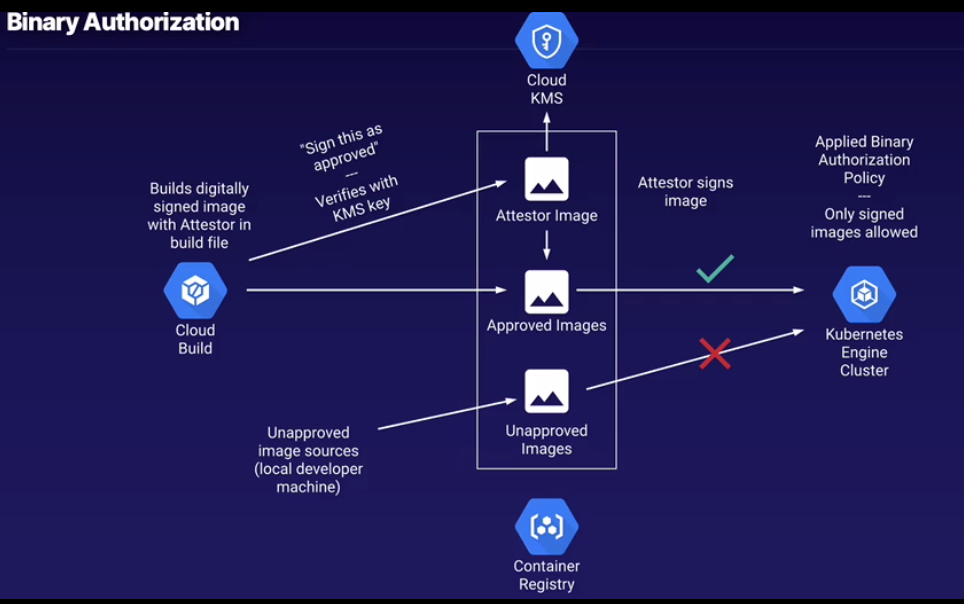
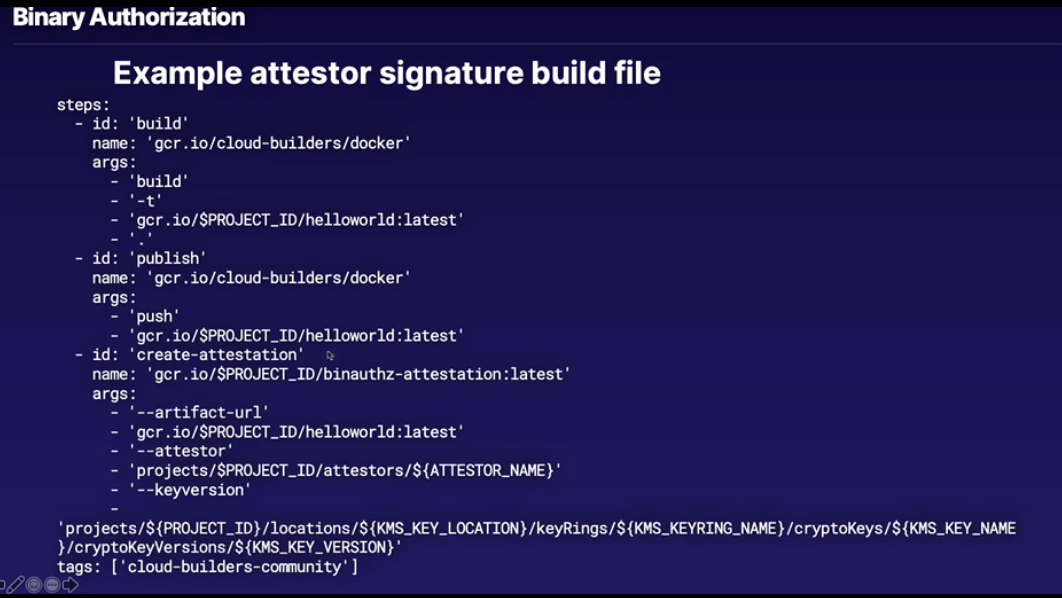
Attestor image sign's the container image that is built via Cloud Build service, if you built and tried to deploy to GKE without the signing the container wouldn't deploy
Full Development Pipeline
Full CI/CD Demo - Concepts
- Cover concepts for full end-to-end CI/CD pipeline
- Install Spinnaker via Google-provided GitHub
- Create the rest of our application pipeline
- One-click script provided for easy setup
- Deploy and manage application in our pipeline:
- Correcting errors before they hit production
- Optimizing Docker images
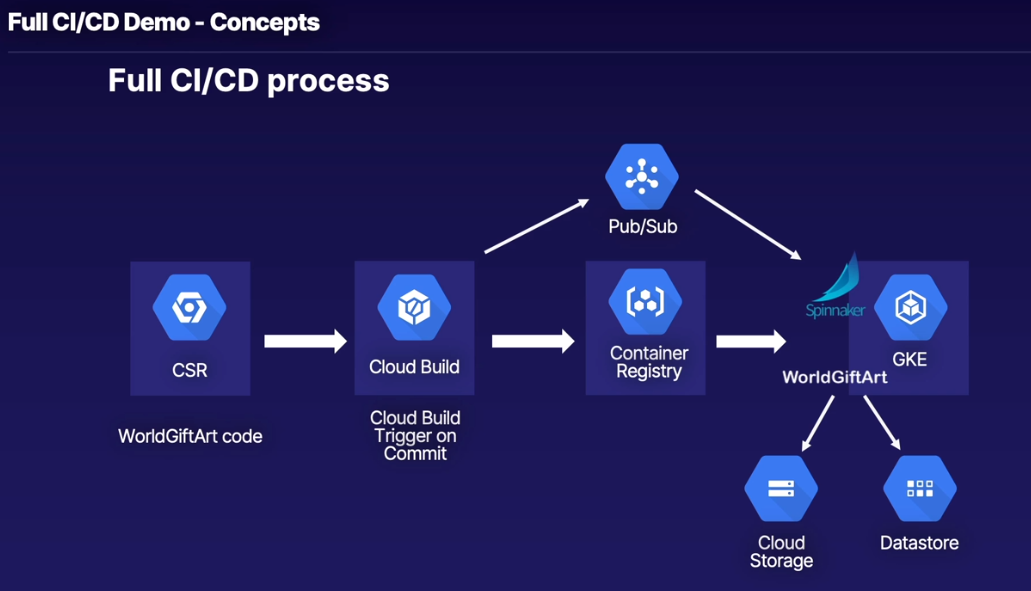
Big-picture Steps:
- Install Spinnaker via Google-provided scripts
- Create rest of pipeline from single script (which we will break down in more detail)
- Create CSR repository using cloned GitHub
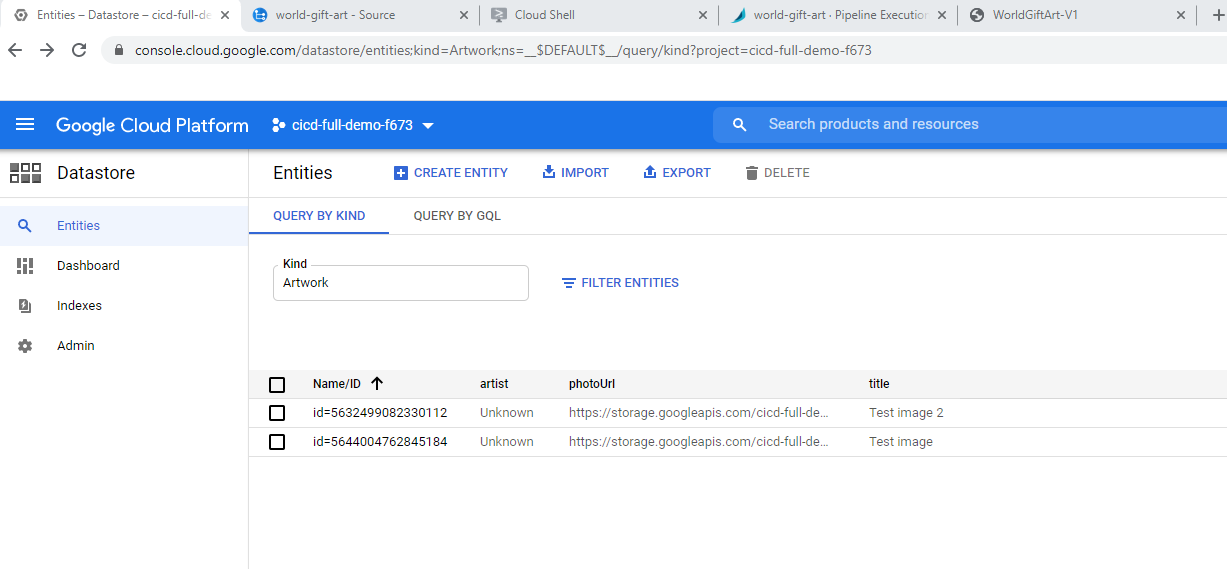
- Create Cloud Storage and Datastore Backends
- Create
cloudbuild.yamlfile with specific variables - Create Kubernetes YAML files to upload to Spinnaker on each commit
- Create Spinnaker application and pipelines
- Create Cloud Build trigger
- Enable Container Registry Vulnerability scanning
- Push app update via commits, and watch the magic happen!
Create Spinnaker Cluster
- Install Spinnaker on a GKE cluster
- Use same Google-provided guide as Spinnaker section
- With a few modifications
- Optional content - Explore Pub-Sub setup in more details
https://spinnaker-1.endpoints.cicd-full-demo-f673.cloud.goog/
Pub/Sub
-
Spinnaker subscribes to
cloud-builds- Spinnaker includes an additional internal account that spinnaker uses:
gcb-account
- Spinnaker includes an additional internal account that spinnaker uses:
-
Cloud Build posts message to
cloud-buildstopic and Spinnaker subscription picks up the message- Subscription is associated with internal account so it knows when builds are publised and can go up to Container Registry to pull new images and bring into staging pipeline
-
propertiesfile line 63export GCP_PUBSUB_SCRIPTION= -
setup.shline 256GCB_PUBSUB_TOPIC=projects/$PROJECT_ID/topics/cloud-builds -
line 274 - Script creates new gcloud pub/sub.subscription
-
Line 303 -
kubectlquick-install.yaml- Line 153 - Config and install halyard
- Line 349 -
gcp-accountcreated and associated with pub/sub subscription (line 352)
Create App Repositories and Pipelines
- Create the rest of the CI/CD pipeline:
- CSR, Cloud Build trigger, Cloud Builder file, custom app backends, K8's YAML files for Spinnaker, Container Registry Vulnerability scanning
- Setup and explore Spinnaker pipelines in further detail
- We will go through script actions in depth
client_id: 672408868773-qi5rtd5ih8d7jeerk28dik728l45tiv6.apps.googleusercontent.com secret: M_RgN7kLWgT92XCDkSvtFMXb
1
- 2x actions in the WebGUI
- Setup a region for
Datastorebackend (Cloud Firestore - legacy naming)Datastore> Select Datastore Mode > Choose a Database Location:europe-west2> Create Database
- Turn on Container Registry vulnerability scanning
- Container Registry > Settings > Enable Vulnerability Scanning
- Setup a region for
2
- Within Cloud Shell, pull down the Linux Academy Script
cd ~
wget https://raw.githubusercontent.com/linuxacademy/content-gcpro-devops-engineer/master/scripts/create_app_and_pipelines.sh
This is a modified script that comes as part of the Google Spinnaker sample application demo
"Every time we push a new commit to our source repository Cloud Build is going to upload each of these YAML (~/world-gift-art/spinnaker-pipeline/config/prod|staging/namespace|replicaset|service.yaml files to our Spinnaker bucket, associated with that specific version of our image that Spinnaker is going to use to run kubectl commands with in order to manage our GKE cluster"
-
cloudbuild.yaml- First Step in this file, uses an ubuntu Cloud Builder image and runs a script
mkdir config-all- Copy & upload all (6) the
*.yamlfiles into the Spinnaker bucket, which Spinnaker will use to create?(no because this is completed in the steps below, maybe to initiatiate the pipelines?) Pipelines (Staging & Production) as it initiates a new namespace, replicaset and load balancer service in both piplines artifacts:- Specify location in Cloud Storage Bucket of where to upload the
yamlfiles
- Specify location in Cloud Storage Bucket of where to upload the
- Copy & upload all (6) the
- Also will:
- Build a new image
- Push image to Container Registry
- First Step in this file, uses an ubuntu Cloud Builder image and runs a script
-
Configure application within Spinnaker and Setup Production & Staging Pipelines
~/spin app save --application-name world-gift-art --cloud-providers kubernetes --owner-email $IAP_USE
Application save succeeded
- Create the 2x Pipelines under the
world-gift-artapplication within Spinnaker
~/spin pi save -f ~/world-gift-art/spinnaker-pipeline/templates/pipelines/deploystaging.json
~/spin pi save -f ~/world-gift-art/spinnaker-pipeline/templates/pipelines/deployprod.json
The tempates that were used to generate these
jsonfiles must have been exported out of Spinnaker 1st from a Gui developed pipeline because they're way too long/complicated to be handcrafted
  "triggers": [
    {
      "attributeConstraints": {
        "status": "SUCCESS"
      },
      "enabled": true,
      "expectedArtifactIds": [
        "4f4d38de-80c3-4bc1-a807-c565bc4024ee"
      ],
      "payloadConstraints": {},
      "pubsubSystem": "google",
      "subscriptionName": "gcb-account",
      "type": "pubsub"
    }
  ]
}
Note the internal
gcb-accountthat is linked with the pubsub subscription that watches thecloud-buildtopic. To inspect within Spinnaker:Applications > world-gift-art > 'Deploy to Staging' Pipeline > Configure > 'Automated Triggers'
- Create Cloud Build Trigger
gcloud beta builds triggers create cloud-source-repositories \
  --repo world-gift-art \
  --branch-pattern master \
  --build-config spinnaker-pipeline/cloudbuild.yaml
CI/CD Pipeline is now built and ready to roll
Deploy and Manage Application
- Commit code changes, and let pipeline handle the rest
- Manually approve promoting stagin pipeline to production
1
-
Edit file:
/home/admin_/world-gift-art/spinnaker-pipeline/worldgiftart/templates/base.html -
Commit & push:
git commit -am "First real commit" ; git push -
Note:
-
Cloud Build is building container image, which was trigger from the
git push- Note steps discussed earlier:
- Push Built container:
Pushing gcr.io/cicd-full-demo-f673/world-gift-art:8ea5bdc - Copy artifacts (
yamlfiles) to GCS:6 total artifacts uploaded to gs://spinnaker-1-uooncaqt01z9k1dntidt-1612281736/world-gift-art-manifests/8ea5bdc/
- Push Built container:
- Note steps discussed earlier:
-
Container Registry
- New image with tag & also shows the status of the vulnerability scanning
-
Check Pipelines in Spinnaker:
Applications > world-gift-art > Pipelines > 'Deploy to Staging' is complete | 'Deploy to Production' is waiting for approval- To view published 'Staging' application:
Applications > world-gift-art > Infrastructure > Load Balancers > Status > Ingress (View External IP Address)
- To view published 'Staging' application:
-
-
Test Application using
ingressip retrieved earlier:- Add artwork, and upload an image
- CLick
+button and notice link failure (Not Found)http://<ingress_ip>/add - Return to the 'home' page and hover over 'Add Artwork
note link is:http://<ingress_ip>/artworks/add`- Therefore we have a link error that needs fixing in our codebase
- Do not promote application to Production and terminate the 'Deploy to Production' pipeline using the
x(Cancel execution)
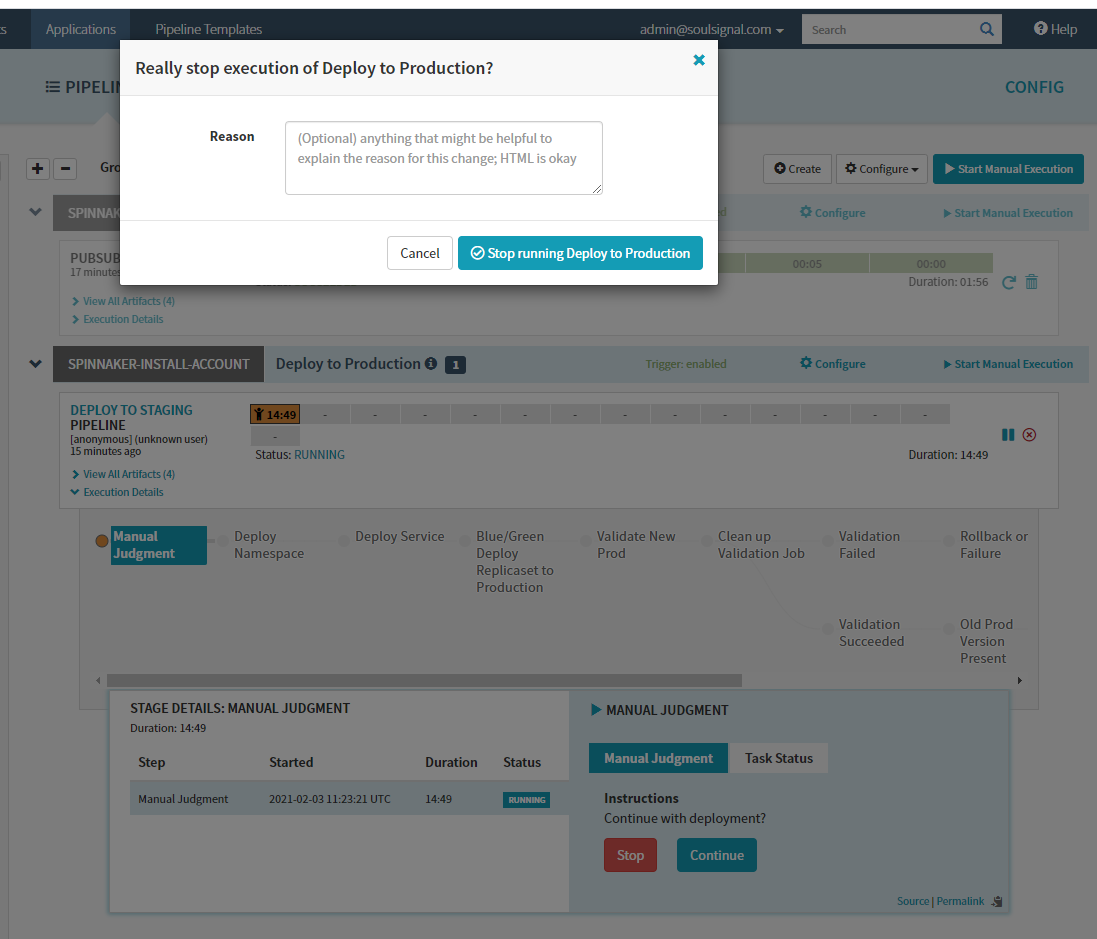
- Return to Cloud Shell and fix broken link
base.htmlline 38 update to/artworks/add- Commit and push
- Note application is now fixed, and approve for production
- Note images are persistent: